Updating HP/Samsung PM9B1 NVMe Firmware on Linux (Because I Refused to Boot Windows)
2026-08-21
I recently picked up some HP OEM Samsung PM9B1 NVMe SSDs (MZVL4256HBJD-00BH1) for use as a mirrored ZFS special vdev. The drives shipped with firmware HPS3NHAV, and HP has a newer HPS4NHAV firmware available.
There was just one problem: HP distributes it as a Windows firmware update utility. These drives live in a Linux server. I didn't particularly feel like removing the drives and putting them into a Windows machine, nor did I want to PXE boot Windows just to update SSD firmware.
So I took the updater apart instead.
Identifying the firmware
The drives initially reported:
$ sudo nvme id-ctrl /dev/nvme0 | grep -E '^(fr|frmw|fwug)'
fr        : HPS3NHAV
frmw      : 0x16
fwug      : 4
Both drives were running HPS3NHAV. After examining the HP executable in Ghidra, I found what appeared to be the embedded replacement firmware and extracted it as HPS4NHAV.bin. The resulting image was exactly 2 MiB:
$ stat -c '%s' HPS4NHAV.bin
2097152
Its SHA-256 is:
8a9148401631189588813d7a47a20d339fa584573517a5ce574f186c6d69042dEven more conveniently, the firmware identifies itself at offset 0x42:
$ xxd -s 0x42 -l 8 HPS4NHAV.bin
00000042: 4850 5334 4e48 4156                      HPS4NHAV
But before sending an extracted binary blob to an SSD controller, I wanted considerably more evidence that this really was what HP's updater sends to the drive.
Reverse engineering the HP updater
The useful part of the updater turned out to be surprisingly straightforward. During initialization it copies an embedded blob into a runtime buffer:
LEA     RSI,[DAT_140294250]
MOV     EDX,0x4000
LEA     RAX,[DAT_14008d2e0]
The copy loop moves 0x80 bytes per iteration and executes 0x4000 times:
0x4000 x 0x80 = 0x200000Exactly 2 MiB - precisely the size of the extracted HPS4NHAV.bin. The updater subsequently reads eight bytes beginning at offset 0x42 from this buffer to obtain the firmware revision string. So we now had two independent matches:
Expected image size:       0x200000
Extracted image size:      0x200000
Expected revision offset:  0x42
Extracted bytes at +0x42:  HPS4NHAV
More importantly, I found the actual firmware download routine. It constructs an NVMe passthrough request with opcode 0x11, which is the standard NVMe Firmware Image Download command:
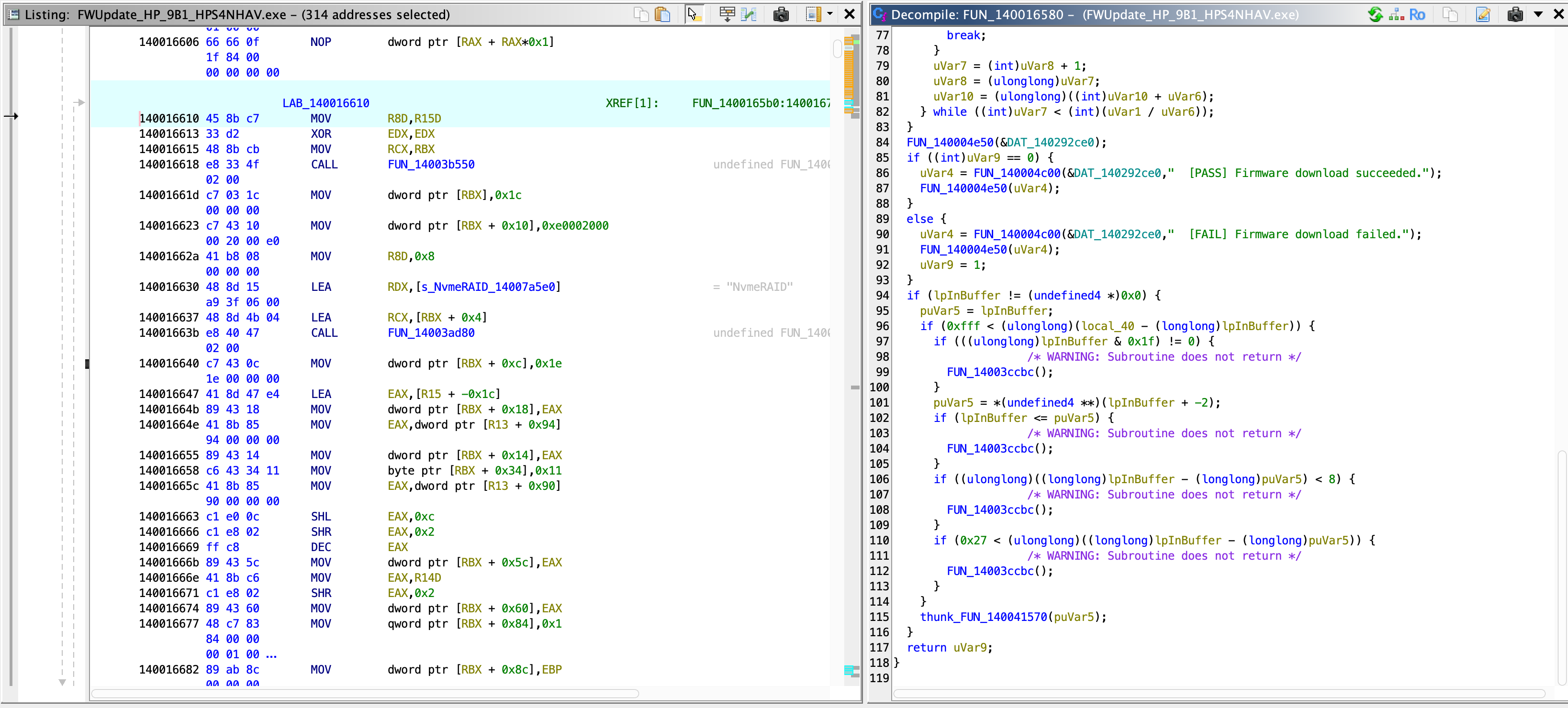
byte ptr [RBX + 0x34],0x11, the Firmware Image
Download opcode - and the decompiler shows the surrounding transfer loop and its
PASS/FAIL logging.
The source of each transfer is:
DAT_140294250 + offsetstarting at offset zero. That detail mattered. During the investigation I'd found a GISD structure much farther into the binary and initially wondered whether the firmware needed to be carved out beginning there. The disassembly proves that it does not: HP sends the entire 2 MiB image beginning at byte zero.
The activation routine then issues NVMe opcode 0x10, Firmware Commit, selecting firmware slot 2 with commit action 1. At this point the Windows utility had essentially told us exactly what it was doing.
Extracting the firmware yourself
You don't have to trust my .bin - the extraction is reproducible from HP's own download. Grab the softpaq:
https://ftp.hp.com/pub/softpaq/sp149501-150000/sp149650.exeExtract it with 7z and you get three updater executables:
-rw-r--r--  1 martin  staff  2732544 Dec 18  2023 FWUpdate_HP_9B1_HPS4NHAV.exe
-rw-r--r--  1 martin  staff  2731520 Oct 17  2023 Samsung_PM9B1 22x80_HPS4NHAV_Update tool.exe
-rw-r--r--  1 martin  staff  2731520 Dec  7  2023 Samsung_PM9B1_2280_HPS4NHAV.exe
The same 2 MiB firmware image is embedded in all three. Carve it out with dd:
dd if='Samsung_PM9B1_2280_HPS4NHAV.exe' \
   of=HPS4NHAV.bin \
   bs=1 skip=$((0x8b2e0)) count=$((0x200000))
And verify:
$ sha256sum HPS4NHAV.bin
8a9148401631189588813d7a47a20d339fa584573517a5ce574f186c6d69042d  HPS4NHAV.bin

$ xxd -s 0x42 -l 8 HPS4NHAV.bin
00000042: 4850 5334 4e48 4156                      HPS4NHAV
Trying it on Linux
These two SSDs form a mirror, so I updated one drive at a time. If anything went catastrophically wrong, I wanted the other member untouched.
First, download the firmware:
$ sudo nvme fw-download /dev/nvme0 --fw=HPS4NHAV.bin
Firmware download success
That was encouraging. Next, commit it to slot 2 using action 1, matching the HP updater:
$ sudo nvme fw-commit /dev/nvme0 --slot=2 --action=1
Success committing firmware action:1 slot:2
The firmware slot log now showed:
$ sudo nvme fw-log /dev/nvme0
Firmware Log for device:nvme0
afi  : 0x21
frs1 : 0x5641484e33535048 (HPS3NHAV)
frs2 : 0x5641484e34535048 (HPS4NHAV)
AFI 0x21 tells the story:
Active firmware slot:             1
Firmware slot pending activation: 2
So the SSD had accepted HPS4NHAV, stored it in slot 2, and scheduled slot 2 for activation following a controller reset.
Activating it without rebooting Linux
I originally expected to reboot the server at this point. Linux, however, exposes an NVMe controller reset through sysfs:
$ echo 1 | sudo tee /sys/class/nvme/nvme0/reset_controller
1
The controller disappeared briefly while the kernel reset and reinitialized it. The kernel log showed:
nvme nvme0: D3 entry latency set to 8 seconds
nvme nvme0: 16/0/0 default/read/poll queues
nvme nvme0: Ignoring bogus Namespace Identifiers
Afterward:
$ sudo nvme fw-log /dev/nvme0
Firmware Log for device:nvme0
afi  : 0x2
frs1 : 0x5641484e33535048 (HPS3NHAV)
frs2 : 0x5641484e34535048 (HPS4NHAV)
Slot 2 was now active. And finally:
$ sudo nvme id-ctrl /dev/nvme0 | grep -E '^(fr|frmw|fwug)'
fr        : HPS4NHAV
frmw      : 0x16
fwug      : 4
Success. No Windows. No WinPE. No physical drive swapping. Not even a reboot.
ZFS survived the controller reset
In my case these SSDs are the two members of a ZFS special-device mirror:
special
  mirror-2
    nvme-SAMSUNG_MZVL4256HBJD-00BH1_...-part4  ONLINE
    nvme-SAMSUNG_MZVL4256HBJD-00BH1_...-part4  ONLINE
After resetting the first controller:
special
  mirror-2                                                ONLINE       0     0     0
    nvme-SAMSUNG_MZVL4256HBJD-00BH1_...-part4             ONLINE       0     0     0
    nvme-SAMSUNG_MZVL4256HBJD-00BH1_...-part4             ONLINE       0     0     0
errors: No known data errors
ZFS remained online with zero read, write, or checksum errors. I still strongly recommend updating mirrored devices one at a time. A mirrored special vdev was exactly why I was unwilling to experiment with both drives simultaneously.
The final procedure
For this specific HP/Samsung PM9B1 and this specific firmware image, the Linux procedure I successfully tested was:
# Verify current firmware
sudo nvme id-ctrl /dev/nvme0 | grep -E '^(fr|frmw|fwug)'
# Verify the extracted firmware
sha256sum HPS4NHAV.bin
# Download firmware
sudo nvme fw-download /dev/nvme0 --fw=HPS4NHAV.bin
# Commit HPS4NHAV to slot 2 and select it for activation
sudo nvme fw-commit /dev/nvme0 --slot=2 --action=1
# Confirm slot 2 contains HPS4NHAV and is pending
sudo nvme fw-log /dev/nvme0
# Reset only this NVMe controller
echo 1 | sudo tee /sys/class/nvme/nvme0/reset_controller
# Verify HPS4NHAV is running
sudo nvme id-ctrl /dev/nvme0 | grep -E '^(fr|frmw|fwug)'
sudo nvme fw-log /dev/nvme0
Known firmware image:
Filename: HPS4NHAV.bin
Size:     2097152 bytes (0x200000)
SHA-256:  8a9148401631189588813d7a47a20d339fa584573517a5ce574f186c6d69042d
Revision: HPS4NHAV at offset 0x42Verify the SHA-256 above before doing anything with it - or better, extract it yourself from HP's softpaq as shown earlier.
Important warning
This procedure documents what worked on my specific drives: Samsung/HP PM9B1, MZVL4256HBJD-00BH1, HPS3NHAV to HPS4NHAV. Firmware flashing always carries some risk. Do not assume that the same slot, commit action, firmware image, or reset behavior applies to another Samsung model or even another OEM variant of the PM9B1. In particular, don't blindly flash a firmware image merely because the drive looks similar.
The reason I was comfortable doing this was that I first reverse engineered the vendor updater and verified exactly which bytes it sends, which NVMe commands it issues, which firmware slot it selects, and which activation action it requests.